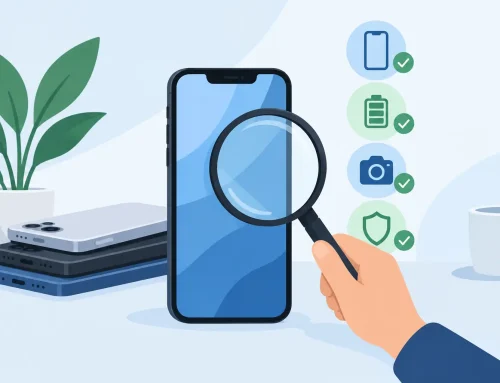
A used phone can save you a lot of money – or give you a headache the moment you insert your SIM. That is why knowing how to inspect used phones matters before you pay. A device can look clean in photos and still have battery issues, display problems, weak signal, or hidden repair history that affects long-term use.
If you are buying a secondhand iPhone, Samsung, Google Pixel, Xiaomi, Oppo, or another mainstream model, the goal is simple. You want to confirm that the phone is genuine, functional, and priced fairly for its condition. A quick glance is not enough. A proper inspection takes a few minutes and can save you from expensive surprises.
How to inspect used phones the right way
Start with the basics before you get distracted by storage size, box condition, or extras. Check the phone’s model number, storage variant, and overall physical condition against the listing or what the seller told you. If a seller says it is a 256GB local set and the device shows something different in settings, that is already a problem.
You should also confirm whether the phone has been reset properly and is ready for activation. On iPhone, Activation Lock is a major issue. On Android, Google account lock can create the same kind of trouble. If the previous owner’s account is still tied to the device, do not treat that as a small admin matter. It can leave you with a phone you cannot use fully.
Check the exterior carefully
Physical inspection tells you a lot about how the device was used. Look at the frame, corners, back glass, camera rings, charging port, and buttons. Small cosmetic marks are normal on used phones, but deep dents, bent frames, or mismatched gaps around the screen can suggest drops or past repairs.
Pay close attention to the screen. Scratches are easy to spot, but what you really want to catch are signs of panel replacement or hidden damage. Look for dead pixels, bright spots, uneven brightness, green lines, flickering, or touch issues near the edges. If the screen lifts slightly from the frame, that can point to a bad repair job or even battery swelling.
The camera lenses also deserve a proper look. Cracked lens covers, fogging, dust under the glass, or heavy scratches can affect image quality more than sellers admit. Cosmetic wear around the camera bump is common, but damage to the lens area is more serious.
Power, display, and touch tests
Once the outside looks acceptable, turn the phone on and use it normally for a few minutes. Do not just open settings and stop there. Swipe across the whole screen, pull down menus, type on the keyboard, rotate the display, and switch between apps. A weak touch panel often shows up only in certain areas.
Set the brightness higher and lower to see whether the display responds properly. On OLED phones, check dark screens and gray backgrounds for burn-in or uneven shading. This matters on older flagship devices that spent a lot of time showing navigation bars, social media apps, or static icons.
Face ID, fingerprint unlock, and basic passcode setup should also be tested if available. Biometric failure does not always make a phone unusable, but it lowers convenience and can affect resale value later.
Battery health is not a small detail
Battery condition is one of the biggest factors in used phone value. A phone can be fully working and still feel frustrating if the battery drains too fast, overheats, or charges unpredictably. On iPhone, battery health is easy to check in settings. If the maximum capacity is already low, factor in the cost of replacement.
On many Android phones, battery health is less clearly shown, so you need to rely on signs. Check whether the battery percentage drops unusually fast during testing. Plug the device in and confirm that charging starts properly. If wireless charging is supported, test that too when possible.
Watch for excess heat during simple tasks. Some warmth is normal, but heavy heat while browsing settings, using the camera, or charging can point to battery wear or internal issues. If the back panel looks slightly raised, stop there. That can be a swollen battery.
Test cameras, speakers, and microphones
A used phone should be tested as a phone, not just as a screen that turns on. Open the camera app and switch through all lenses. Take photos in bright light and indoors. Check autofocus, portrait mode, video recording, zoom behavior, and front camera performance. If one lens fails to switch properly or shows blur that the others do not, there may be damage.
Play audio through the speakers and listen for distortion, crackling, or imbalance. Then record a voice memo and play it back. If the mic sounds weak or muffled, the issue could be dirt, water exposure, or hardware damage.
Make a test call if possible. This checks the earpiece, microphone, network connection, and speakerphone in one go. A lot of problems that do not show up in a photo listing appear immediately during an actual call.
Network, SIM, and connectivity checks
A phone is not a good deal if it has signal issues or limited carrier support for your needs. Insert a SIM card and confirm that the device reads it properly, connects to the network, and can make calls, send texts, and use mobile data. In Singapore especially, where buyers often compare local sets and imported units, network compatibility matters more than some people realize.
You should also test Wi-Fi, Bluetooth, GPS, and if relevant, NFC. Connect to Wi-Fi, pair a Bluetooth device, and open maps to see whether location locks properly. These are basic features, but repairs or board-level issues can affect them.
If the phone is dual SIM, test both slots when possible. If eSIM support matters to you, verify that the specific model supports it in your region. Not all variants are the same, even within the same phone name.
Verify IMEI and lock status
If you only do one backend check, make it this one. Compare the IMEI on the device with the IMEI on the tray, box if available, and system settings. They should match. A mismatch is a red flag.
You also want to know whether the phone is blacklisted, carrier-locked, or still tied to financing. A clean IMEI does not guarantee perfection, but skipping this step creates unnecessary risk. If a seller is vague about the device history, treat that as part of the condition too.
For iPhone, check that Find My has been turned off and the phone activates without asking for the previous owner’s account. For Android, make sure there is no factory reset protection problem waiting after setup. A phone that is not properly cleared is not ready for sale.
Watch for signs of repair or water damage
Repairs are not always a deal-breaker. A properly replaced battery or screen can be fine. The problem is poor repair quality or undisclosed work. Uneven screws, loose buttons, weak adhesive, non-original display warnings, strange vibration feel, or front cameras that sit slightly off-center can suggest the phone has been opened before.
Water damage is harder to judge from appearance alone. Look for fog in the camera, corrosion near the SIM tray, speaker distortion, or charging inconsistency. Some phones have liquid contact indicators, but not all buyers know where to look, and not every seller will let you open anything. That is why broad functional testing matters.
Match condition to price
This is where many buyers get too optimistic. A used phone is not just about whether it powers on. Price should reflect battery health, cosmetic wear, repair history, included accessories, warranty status, and how complete the testing is.
A cheaper listing is not automatically better value. If one device is slightly more expensive but has been properly checked, has stronger battery condition, and is ready to use, that can be the smarter buy. This is also why buying from a shop that allows in-person testing can reduce risk. At Gadget Affair, for example, buyers can inspect and test used devices before making a decision, which is often worth more than saving a small amount on an uncertain private deal.
A practical inspection routine before payment
If you want a simple way to handle everything, use this order. First confirm the model, storage, and account lock status. Then inspect the body and screen. After that, test touch response, cameras, speakers, mics, charging, battery behavior, network, Wi-Fi, and biometrics. Finally, verify the IMEI and ask directly about repair history.
That whole process does not take long, but it gives you a much clearer picture of what you are actually buying. Used phones can be excellent value when the condition matches the price and the device is ready for daily use. The best deals are rarely the ones that look cheapest at first glance – they are the ones that still feel like a good buy a month later.