That $5 charger may look like the one that came with your phone, right down to the logo and printed wattage. The problem is that a fake can have weak insulation, poor soldering, or no reliable protection against overheating and power surges. Knowing how to identify fake chargers can protect more than your battery – it can help prevent damaged ports, swollen batteries, and avoidable electrical risks.
A charger does not need to carry a big-name logo to be safe. Plenty of reputable third-party brands make reliable USB-C, Lightning, and wireless charging accessories. The concern is counterfeit or falsely labeled products that copy a brand, exaggerate their charging capability, or use safety markings they have not earned.
How to Identify Fake Chargers at a Glance
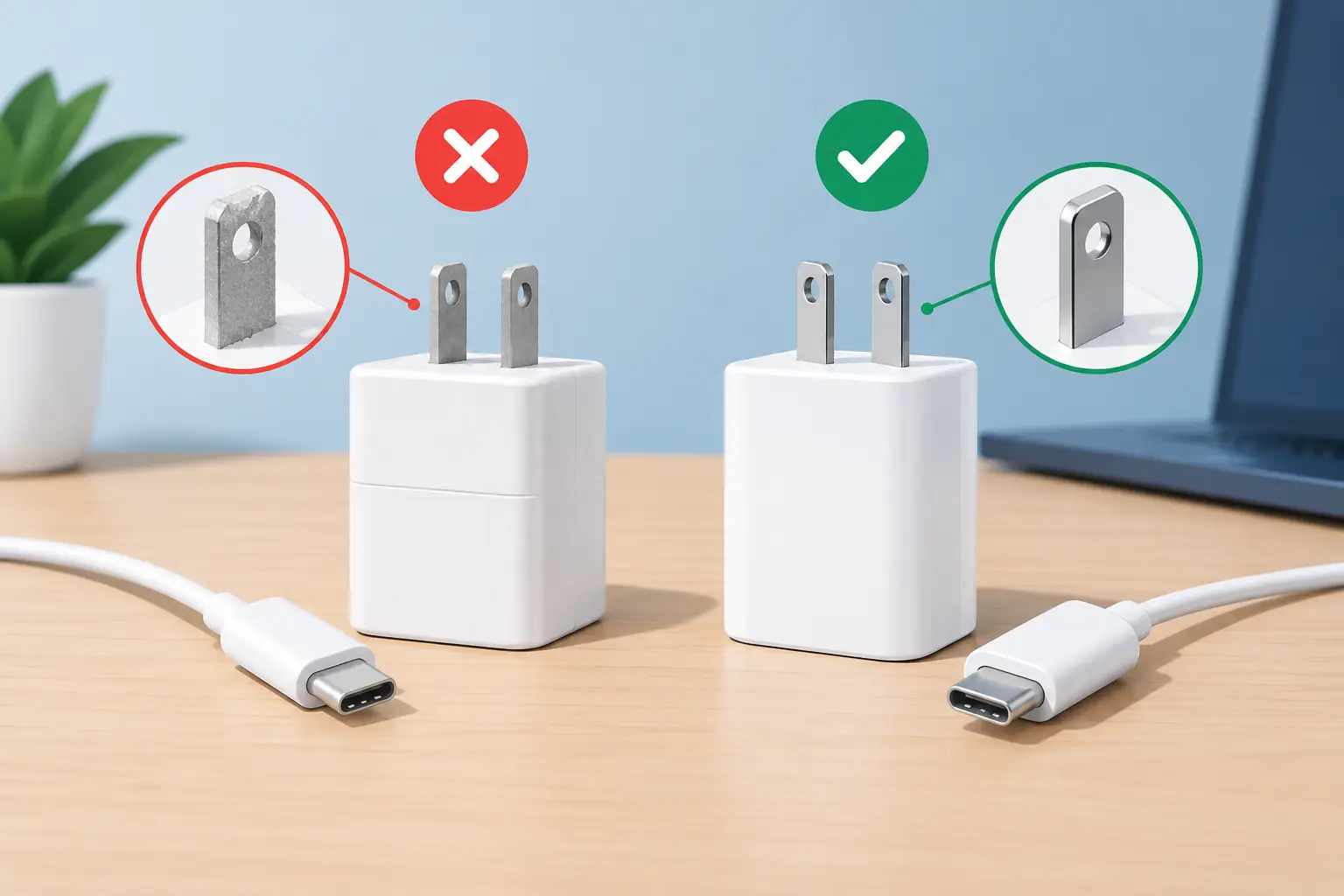
Start with the overall finish. Genuine chargers and quality accessories are not always fancy, but they should feel deliberate. The plastic casing should sit flush with no gaps, sharp molding seams, rattling parts, loose pins, or uneven edges around the USB port. A very light charger is not automatically fake, but an unusually hollow feel can be a warning sign because safe chargers need internal components for heat control and electrical protection.
Look closely at the printing. Spelling mistakes, fuzzy logos, crooked text, mismatched fonts, and labels that rub off easily are common red flags. Check that the model number, input, output, and manufacturer details are readable. A proper label usually states something like input voltage and frequency, then one or more output ratings in volts and amps or watts.
Be careful with claims that sound too good for the size and price. A tiny no-name adapter promising 120W charging for every phone, tablet, and laptop is worth questioning. High-output chargers can be compact, but reputable manufacturers clearly explain the total output, the maximum output per port, and the supported charging standards.
Check the Label, but Do Not Trust It Blindly
Safety marks matter, but a printed symbol alone is not proof. Counterfeit accessories can copy certification logos just as easily as they copy Apple, Samsung, or other brand logos. In the U.S., you may see markings from testing organizations such as UL or ETL. If a charger claims certification, the brand should have a real company identity, a model number, and product information that matches the packaging and listing.
Compare the charger label against the official specifications for the brand and model when possible. Counterfeits often get small details wrong: an incorrect model code, the wrong font, output figures that do not match the genuine version, or a serial number repeated across multiple units.
For USB-C chargers, look beyond the largest wattage number. A trustworthy label may list several USB Power Delivery profiles, such as 5V, 9V, 15V, and 20V. That does not mean every device will receive the top wattage. Your phone, cable, and charger must all support a compatible charging profile. A clear spec sheet is a good sign. Vague wording like “super fast for all devices” is not.
Inspect the Cable Too
A safe charger paired with a poor cable can still cause charging problems. Fake or low-quality cables may have thin conductors, weak strain relief, loose connectors, or chips that do not correctly manage power delivery.
Check both connector ends. They should fit firmly without needing force, and the cable should not disconnect when the phone is moved slightly. Watch for bent metal contacts, discoloration, exposed wiring, fraying near the connector, or a plug that gets hot during normal use. Stop using a cable with any of these signs.
For USB-C fast charging, the cable must support the power you expect to draw. Some USB-C cables are suitable for basic phone charging but not for high-wattage laptops or tablets. An honest product listing states its wattage rating and data capability instead of implying that every USB-C cable does the same job.
Charging Behavior Can Reveal a Problem
A fake charger is not always obvious when you first plug it in. Pay attention to how it behaves over several charging sessions. A charger that becomes mildly warm can be normal, especially when powering a tablet or fast-charging a phone. A charger that becomes too hot to hold, gives off a burning smell, buzzes, crackles, or causes the connection to cut in and out should be unplugged immediately.
Other warning signs include repeated touchscreen glitches while charging, a phone that reports unsupported accessory messages, charging that constantly starts and stops, or a battery percentage that rises unusually slowly despite a claimed fast-charge rating. These symptoms can also come from a dirty port, damaged cable, or aging battery, so do not assume the adapter is the only cause. Test with a known-good cable and charger before replacing parts.
Do not try to open a suspicious charger to inspect it. Wall chargers contain components that can retain electrical energy, and opening the casing can create a hazard. If it looks damaged or behaves unpredictably, replace it.
How to Identify Fake Chargers Before Buying
The safest check happens before checkout. Buy from an established retailer or directly from a recognized brand, especially for chargers that will be used overnight, in a car, or with expensive devices. Extremely low prices are not always a scam, but price should make sense for the claimed wattage, cable type, warranty, and certification.
Read the listing carefully. It should name the manufacturer, state the model number, show actual product photos, and explain what is included. Be cautious when the listing uses stock photos only, hides the brand, or mixes unrelated terms such as “original,” “OEM,” “premium,” and “compatible” without giving real specifications.
If you are buying a used charger, inspect the prongs, casing, and ports in person. Ask whether it has been tested under load, not just whether a phone icon appeared when it was plugged in. At Gadget Affair, the same practical rule applies to accessories as it does to pre-owned devices: condition and testing matter more than a vague promise that something is “like new.”
Packaging can offer clues, but it is not decisive. Genuine packaging is usually clean, well-fitted, and specific about the product inside. Still, counterfeiters can make convincing boxes. Treat packaging as one check among several, not your only proof.
Choose the Right Charger, Not Just a Real One
Authenticity is only half the decision. A genuine 5W charger can be perfectly safe but frustratingly slow for a modern phone. On the other hand, buying the highest wattage available may not improve charging if your device cannot use it.
For most current phones, a reputable USB-C Power Delivery charger in the 20W to 30W range is a practical everyday choice, provided your phone supports USB-C charging or you have the correct certified cable. Tablets and laptops may need more. If you use a multi-port charger, check how its total wattage is shared. A 65W adapter may deliver 65W through one port but split that power when two devices are connected.
Wireless chargers need the same scrutiny. Look for a stable charging pad, clear power ratings, and a properly matched wall adapter. If the pad repeatedly overheats your phone or stops charging with a case that should be compatible, do not keep forcing it.
What to Do With a Suspicious Charger
Unplug it, stop using it, and do not pass it on to someone else. If it came with a new device or was sold as genuine, keep the receipt, packaging, and photos of the label so you can contact the seller. If a charger has scorched marks, melted plastic, a burnt smell, or damaged prongs, dispose of it through an appropriate electronics recycling option rather than placing it in regular household trash.
A charger is a small purchase, but it handles mains electricity every time you power up. Spend a little more for clear specifications, a credible seller, and a product that feels properly made. Your phone is replaceable. A shortcut around charging safety is not worth the risk.