A tablet does not need to be brand-new to do the job well. For school notes, Netflix, casual gaming, video calls, reading, or handling work on the move, used tablets can offer better storage, a larger screen, or a higher-spec model for the same budget as a basic new device. The key is buying based on condition and real-world usability, not just the sticker price.
A good pre-owned tablet should feel like a smart purchase from the first tap. That means clear condition details, a proper test before payment where possible, and a model that will still support the apps and accessories you actually use.
Why Used Tablets Make Sense
Tablet prices can climb quickly once you move beyond entry-level models. A used iPad, Samsung Galaxy Tab, or other recognized-brand device can give you a better display, more storage, stronger speakers, and smoother multitasking without paying full retail price.
This matters when the tablet will be used daily. A student working through PDFs and online lessons may benefit more from a larger 10-inch screen and 128GB of storage than from buying a newer but lower-spec model. The same goes for families sharing a device at home. More storage means fewer arguments over which games, videos, or downloaded shows need to be deleted.
There is also less pressure to baby the device. A well-priced used tablet can be a practical travel screen for kids, a kitchen display for recipes, or a second device for meetings. It is still worth protecting with a case and screen protector, but a sensible pre-owned purchase can make more financial sense than handing a brand-new premium tablet to a young user.
Of course, used is not automatically better. If you need the latest processor for demanding creative apps, guaranteed maximum software support, or a sealed device for a gift, new may be the right call. The value of pre-owned comes from choosing a model whose age, condition, and price match your needs.
What to Check Before Buying Used Tablets
The best deal is not necessarily the lowest-priced listing. A tablet with an unclear history, poor battery life, or activation issues can quickly become an expensive headache. Start with the basics and test the parts you will use every day.
Screen condition matters most
Turn the display on and check it at different brightness levels. Look for deep scratches, cracks, dead pixels, unusual lines, flickering, or yellow patches. On OLED models, display burn-in can show up as faint ghost images from old app icons or navigation bars, especially against a plain white or gray background.
Small cosmetic marks on the frame may be fine if you are buying for value. A damaged screen is different. It affects daily use, resale value, and repair costs. If you take notes, draw, or edit photos, test touch response across the whole screen rather than just tapping a few icons.
Battery health and charging
Tablets generally have larger batteries than phones, but batteries still wear down with age. Watch how quickly the battery percentage moves during your test. Plug it in and confirm that it charges properly without needing the cable to sit at a particular angle.
Some devices show battery health information in settings, while others do not. Even when an exact percentage is unavailable, real use tells you a lot. A tablet that gets unusually warm while charging, drains rapidly during a short video, or repeatedly restarts deserves a closer look.
Ports, buttons, cameras, and speakers
These checks take only a few minutes and can prevent regret later. Test the volume and power buttons, charging port, microphones, cameras, Wi-Fi, Bluetooth, speakers, and headphone jack if the model has one. Play a video at a moderate volume to listen for distortion or rattling.
If you plan to use a stylus, keyboard, or external storage, check compatibility before buying. Not every tablet supports the same pen generation or keyboard case, and accessories can add a meaningful amount to the final cost.
Activation and account status
A tablet must be fully signed out of the previous owner’s account before it changes hands. For Apple devices, Activation Lock should be removed. For Android tablets, the previous Google account should be removed and the device should be factory reset properly.
Do not accept a promise that an account can be removed later. If the tablet asks for someone else’s login after a reset, you may not be able to use it at all. Buying from a retailer that checks pre-owned stock and states device condition clearly reduces this risk.
Pick the Right Tablet for the Job
A used tablet is only a bargain if it suits how you use it. Start with screen size, storage, software support, and connectivity. Brand preference matters, but the daily experience matters more.
For note-taking, browsing, streaming, and a smooth app experience, an iPad is often the straightforward choice, especially if you already use an iPhone or Mac. Check the exact generation rather than buying by name alone. Two iPads that look similar can have very different chips, storage options, connector types, and support for Apple Pencil models.
Samsung Galaxy Tabs are worth considering if you use Android and want features such as expandable storage on selected models, multitasking tools, or a bundled S Pen on certain devices. They can be excellent for media, work documents, and Android gaming. Just check the software version and whether the apps you rely on will continue receiving updates.
For basic viewing, reading, web use, and video calls, older entry-level tablets can still be enough. Do not overspend on a premium model if it will mostly sit on the couch playing YouTube. On the other hand, avoid buying a device that is so old it struggles with current apps or has very limited storage. Saving a little upfront is not worth a slow tablet that becomes frustrating within months.
Storage, Wi-Fi, and Cellular: Avoid the Common Mismatch
Storage is one of the easiest specs to underestimate. A 32GB tablet may work for light browsing, but system files, messaging apps, photos, games, and downloaded shows fill it fast. For many buyers, 64GB is a more comfortable starting point. Choose 128GB or more if you keep media offline, play large games, or want the tablet to last longer.
Then consider connectivity. Wi-Fi-only models are usually more affordable and are enough for home, school, office, or anyone who regularly uses a phone hotspot. Cellular models are useful if you need internet away from Wi-Fi and prefer not to rely on your phone. Just make sure the model supports the type of SIM or eSIM arrangement you plan to use.
It is also worth checking the charging standard. USB-C is convenient because one cable may work across your phone, tablet, power bank, and laptop. Older Lightning or micro-USB models are not unusable, but you may need separate cables and accessories.
Buy With a Clear Condition Standard
Condition labels should tell you what you are getting, not leave you guessing. Light wear around the edges is normal on a used device. A deep dent, loose screen, weak battery, or camera that will not focus is something else entirely.
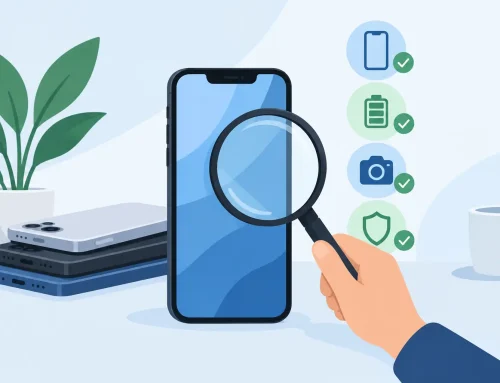
Ask what is included with the tablet. A box, cable, charger, stylus, or keyboard can affect the value, but do not assume they are part of the deal. More importantly, ask whether the device has been checked for display, charging, buttons, connectivity, cameras, and account lock status.
If you can inspect the tablet in person, take the opportunity. At Gadget Affair’s Burlington Square store, customers can view and test used devices before deciding. That hands-on check is especially useful when comparing two similarly priced tablets with different storage capacities or cosmetic condition.
A used tablet should give you confidence, not force you to compromise on the basics. Choose the model that works for your apps, check the condition properly, and keep enough room in the budget for a good case. The right pre-owned tablet can stay useful long after the excitement of buying it wears off.