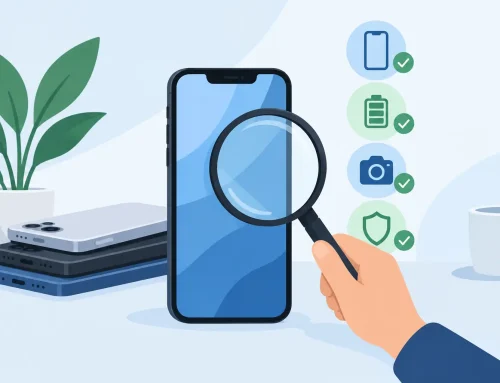
A used phone can look spotless on the counter and still have a weak battery, a faulty camera, or a network issue hiding underneath. So, can I test used phones before buying? Yes – and you should. A trustworthy seller should give you enough time to check the device properly before you pay, especially when you are comparing a pre-owned model against a new one.
Testing does not need to take an hour or require technical skills. A focused 10 to 15 minutes can tell you whether the phone is performing as expected, whether its condition matches the listing, and whether the price makes sense for the device in front of you.
Can I Test Used Phones Before Buying?
In most cases, yes. Ask to inspect the exact unit you will be taking home, not a display unit or a similar phone from the same model range. The storage capacity, color, cosmetic condition, battery status, and included accessories should all match what was advertised or discussed.
A proper test is about more than turning the screen on. You want to confirm that the essentials work: display, touch response, cameras, speakers, microphones, charging, wireless connections, buttons, biometric security, and mobile network capability. If the seller has already inspected the device, your test is a second layer of confidence, not an inconvenience.
There are limits. A quick in-store check cannot predict exactly how a battery will perform six months from now, and it cannot recreate every real-life situation. But it can catch the problems that matter most before your money changes hands.
Start With the Physical Condition
Before opening settings, look over the frame, screen, camera lenses, and charging port under good lighting. Minor scuffs are normal on a pre-owned phone, particularly around corners and the charging port. What matters is whether the condition has been clearly described and whether the marks affect use.
Check the screen from different angles. Deep scratches, chips, lifting edges, discoloration, bright spots, and lines across the display deserve attention. A screen protector can hide light scratches, so ask if one is installed and inspect the screen carefully if possible.
Look at the camera lenses as well. A scratched lens cover can make every photo look hazy, even if the phone body is otherwise clean. Check that the SIM tray sits flush, the volume and power buttons do not feel loose, and the charging port is not packed with dirt or damaged pins.
Check the Screen, Touch, and Buttons
Turn the brightness up and open a plain white screen, then a dark screen. This makes dead pixels, uneven backlighting, burn-in, and display tint easier to spot. OLED phones can show faint ghost images from old app icons or navigation bars. Slight color variation may not affect daily use, but obvious burn-in should be reflected in the price.
Next, test touch across the whole display. Open the keyboard, a drawing app, or any screen where you can tap and drag from edge to edge. Make sure every area responds. Pay extra attention to the edges, where touchscreen issues can be easy to miss.
Press the power, volume, and mute or action buttons where applicable. Confirm that the fingerprint reader or face unlock can be set up and recognizes you consistently. If a phone struggles to register a fingerprint during a simple test, do not assume it will get better after you leave the store.
Test the Features You Will Actually Use
A used device should be tested like a daily driver, not just switched on for appearance. Work through the core functions one by one:
- Make a test call if a test SIM is available, then check both the earpiece and the microphone.
- Play music or video to hear the main speaker, and connect Bluetooth if wireless audio matters to you.
- Open the front and rear cameras, take photos, record a short video, and test focusing, flash, zoom, and stabilization.
- Plug in a charging cable and make sure the phone recognizes power without needing the cable held at an angle.
- Turn on Wi-Fi, Bluetooth, GPS, and mobile data where available. A phone that cannot hold a connection is not a bargain.
Do not forget vibration and proximity behavior. During a call, cover the top area of the screen to see whether the display turns off as it should. It is a small test, but a failed proximity sensor can lead to accidental taps whenever you take a call.
Check Battery Health Without Guesswork
Battery condition is one of the biggest differences between a new phone and a used one. iPhones provide a Battery Health percentage in settings. On Android, the information varies by brand and model, so you may not always get one clear number. That does not mean you should ignore the battery.
Look for warning messages, sudden percentage drops, overheating while doing basic tasks, or a phone that restarts unexpectedly. Leave the display on for a few minutes, open the camera, play a short video, and see whether the battery drops abnormally fast. Test charging too, because a healthy battery is less useful if the port or charging circuitry has a problem.
There is no universal battery-health percentage that makes every used phone good or bad. It depends on the model, price, age, and your usage. A phone with a lower battery-health figure may still be a sensible budget buy if the price is fair and you mainly need it for messaging, calls, and light apps. For heavy gaming, long workdays, or frequent video recording, paying more for better battery condition is usually worth it.
Confirm It Is Ready for Your Account and Network
This is the check that should never be skipped. The phone must be fully signed out of the previous owner’s account and ready for a new user to activate. For Apple devices, Activation Lock must be removed. For Android phones, confirm there is no Google account lock or reset protection issue waiting after setup.
Ask to see the device’s IMEI or serial number in the settings and compare it with the box if a box is included. The numbers should match when the box is represented as the original one. A seller should also be able to explain whether the phone is unlocked or tied to a specific carrier.
If you rely on a physical SIM, check that the tray is present and reads a SIM correctly. If you plan to use eSIM, confirm the model supports it for your carrier. Network compatibility can differ by model region, so do not assume every version of the same phone works the same way.
Ask the Questions That Protect Your Purchase
A clean phone is only part of the deal. Ask whether the device has had any repairs, particularly a screen, battery, camera, back glass, or charging port replacement. A repaired phone is not automatically a bad purchase. The key is knowing what was repaired, whether the replacement part works correctly, and whether that repair affects features such as water resistance or biometric authentication.
Also ask what is included. Original box, charging cable, adapter, case, and screen protector can add value, but they should not distract from the condition of the phone itself. Confirm the return, exchange, or warranty terms before payment. These policies vary by seller and device condition, so getting a clear answer upfront avoids awkward surprises later.
At Gadget Affair, used devices can be viewed and tested in-store, which is useful when you want to compare actual condition instead of relying only on photos. If you are visiting a shop, bring your SIM card, or at least be ready to sign in to a test account temporarily so you can check the features that matter to you.
When a Used Phone Is Worth Buying
A tested used phone is often the smart choice when you want more storage, a better camera, or a higher-tier model without paying new-device pricing. It works especially well if you are replacing a broken phone quickly, buying a reliable device for a student, or choosing a secondary phone for work and travel.
Walk away if the seller will not let you inspect the exact unit, cannot answer basic questions about account status, or rushes you past testing. A fair used-phone deal should feel clear, not pressured. Take the few extra minutes at the counter, test the phone the way you plan to use it, and buy only when the device and the price both feel right.